
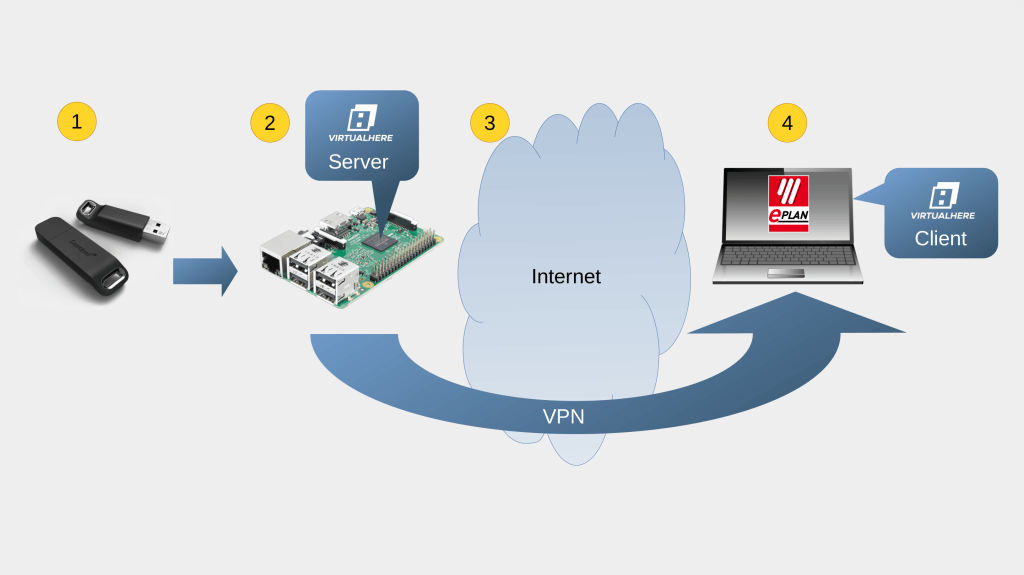
A tip on how to make a Sentinel Hardlock key accessible through internet
Introduction
A lost licence key will bring to serious trouble, as with the key is lost also the licence. Therefore, whoever looses the key, loses also the tied licences and might have to repurchase them all. That can be a traumatic experience.
Someone might say, just keep the key in the office… But that is not always possible, sometimes we have to go to see clients, sometimes we have to do some home-office, sometimes there is a need to do some on-site work. There might be also other reasons, why might we need to take the key with us.
Solution with USB port forwarding
A solution to that would be to forward the key over internet using a virtual USB port. This is a server-client solution where we attach the licence key into a remote computer that acts as a server that makes it’s USB ports available to different clients.
On the client we install a virtual USB port driver which enables us to connect to the server. From the perspective of the operating system, the network part is completely transparent is the same if we have in between a LAN, a direct connection over internet or over VPN. What the OS sees, is just another USB device attached.
Here I must state that this is a “port forwarding system” and not a “port sharing system”. What do I mean by that?
That means that one single USB port and with it the attached device, can be forwarded to only one client at a time. That means no simultaneous connections and by consequence no “sharing”.
Use case with Hardlock licence key
My practical solution is based on the following technologies:
As shown shown in the image below, it is configured as follows:
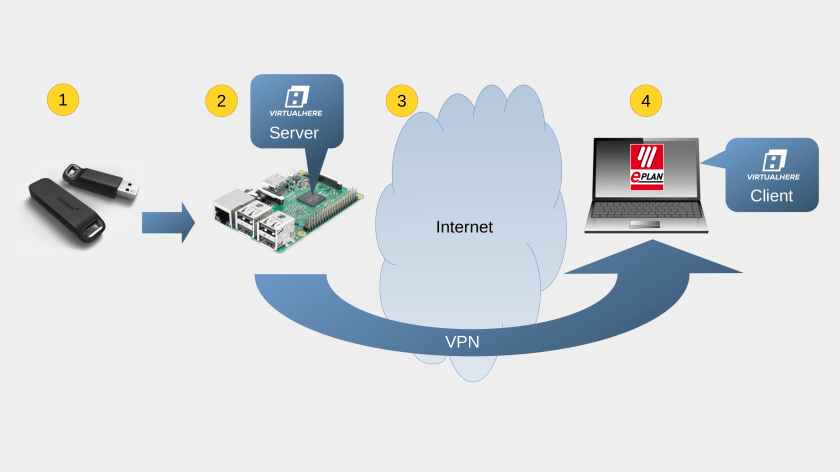
The solution is applied as follows:
- Sentinel Hardlock Key is inserted in the USB slot of the Raspberry Pi3
- The Raspberry Pi 3 has installed the vanilla operating system and the VirtualHere Server software.
- The access from outside networks (Internet) to the Sentinel Hardlock key is provided through a VPN.
- On the laptop computer, for which we need remote access to the key, we installed: the VirtualHere client, the VPN client an the Sentinel Hardlock key driver.
Practical experience
Using this solution I can access the Hardlock key from any location as long as basic uninterrupted internet is given. It works even with a good 2G (EDGE) connection. I was using it on trade fairs, public transport, by clients, on construction sites and so on.
Once a while the USB Virtualization service hangs (or looses connection), but it happens so rarely that I did not bother researching the reasons. A hardware reset of the Raspberry is enough to put it on-line again.
Conclusion
After all I must say that this solution works for me. If I forget about the occasional reset, it works perfectly. I can leave the office and work around and abroad, without the fear of loosing or damaging the Sentinel Hardlock licence key.
 iGeneering
Leave a comment